Scripts / PRP Pawn Shop
PRP Pawn Shop
A pawn shop players actually use. They pick what to sell from a clean shop screen, and get one shot per visit at a better price on a haggle bar.
Not on sale yetIn release prep. We announce it in Discord when the Tebex listing goes live.
Needs ox_lib, ox_inventory, and Qbox, QBCore or ESX.
Gameplay
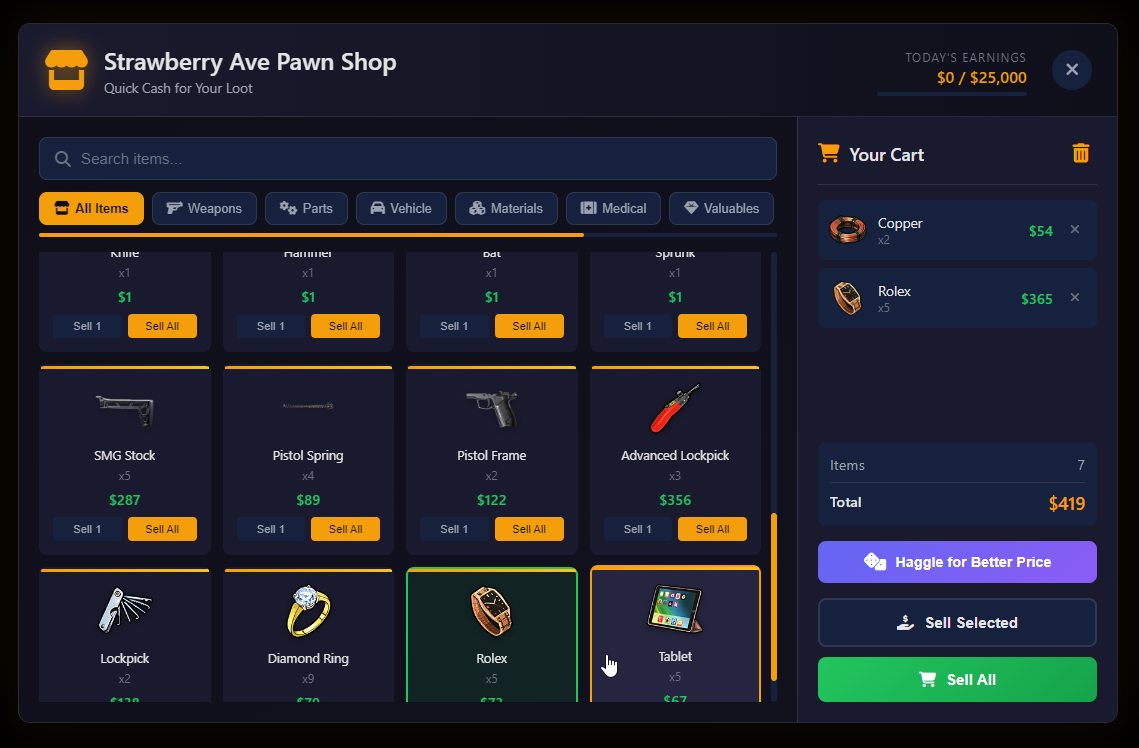
Players walk up to the shop's NPC, open the screen, and sell what they carry. The haggle is optional, and it can go wrong.
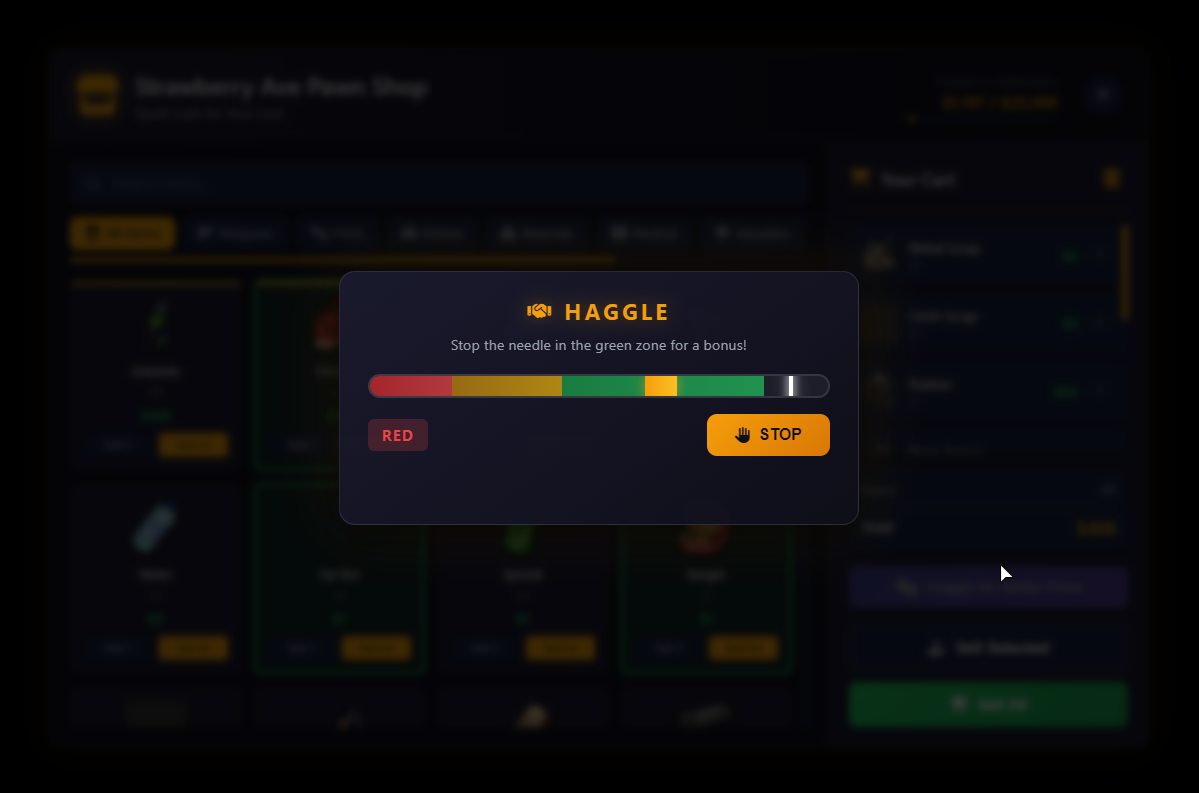
One haggle per visit
A needle bounces across a pressure bar and speeds up with every pass. Stop it in gold for the biggest bonus, in green for a solid one, in yellow for a little, or in red and the price drops. The result applies to every sale for the rest of the visit, and each character waits eight minutes before haggling again.
Sell what you carry
Everything in the inventory that isn't blacklisted, with category tabs, search, a cart, Sell 1, Sell All and a confirm step.
Prices that hold
Each item's price is set once per visit, so the price on screen is the price paid.
Daily limits
A cap per sale and a cap per day for each character, with a bar showing today's earnings.
Three shops to start
Downtown, Vinewood and Strawberry Ave, each with an NPC, a blip, opening hours and payout in cash, bank or dirty money.
Compatibility
Framework, inventory, target and notifications are detected at startup and can be set by hand in config/config.lua.
- Required
- ox_lib and ox_inventory; Qbox, QBCore or ESX.
- Target
- ox_target or qb-target. With neither, players get a press-E prompt.
- Database
- None. Daily totals are kept in memory and reset when the resource restarts.
- Notifications
- Built-in card, prp-notify, ox_lib, okokNotify, mythic_notify, wasabi, t-notify, ps-ui, QBCore, ESX or chat.
- Languages
- Notifications and prompts in English, Spanish, French, German and Brazilian Portuguese. The shop screen is in English.
- Tested
- Runs on our server with Qbox, ox_inventory and ox_target. The QBCore and ESX adapters are included.
Configuration
The config, translations and framework adapters ship unencrypted. The client and server code is escrowed through the Cfx Portal.
What you can change
- Economy
- Per-sale and daily caps, sale cooldown, and how generic items are priced.
- Items
- Premium items with price ranges, a blacklist, and categories.
- Job gear
- Armory and loadout items forced to scrap prices so they can't be flipped for cash.
- Haggle
- Skill bar, a simple dice roll, or off. Zone sizes, payouts and cooldown.
- Shops
- Location, NPC, blip, opening hours, payout account, and theme colors.
What the server checks
- Prices
- Set on the server from its own copy of the player's inventory. The client sends only item, count and slot.
- Sessions
- Tied to the player, short-lived, and opened only within 15 meters of the shop during its hours.
- Caps
- Per-sale and daily limits per character, plus a cooldown between sales.
- Haggle
- The server runs the needle's clock and checks the stop time against it.
- Logging
- Console logging is on by default. An optional Discord webhook, off by default, logs sales with character name and identifier. No usage ping.
Common questions
Short answers. The docs have the detail.
When can I buy PRP Pawn Shop?
It is in release prep and not on sale yet. We announce it in our Discord when the Tebex listing goes live.
Does it need ox_inventory?
Yes. It needs ox_lib, ox_inventory, and Qbox, QBCore or ESX.
Can players sell job gear for easy money?
Armory and loadout items are forced to scrap prices, and you can add your own items and patterns to that list.
What stops players draining the economy?
Prices are set on the server, every character has a per-sale and a daily payout cap, and there is a cooldown between sales. You set all three.
Does it need a database?
No. Daily totals are kept in memory and reset when the resource restarts.
Can I change how it looks?
Yes. Theme colors are set in the config, and each shop has its own name, NPC, blip and hours.